
We’ve all been there. You’re staring at a 200 page report, knowing the answer to your question is buried somewhere in those dense paragraphs. Finding it feels like searching for a specific grain of sand on a beach.
Traditional document reading is painfully slow. Most of us don’t have hours to spare scrolling through endless pages hoping to stumble upon the information we need.
This is precisely why document chat tools have exploded in popularity. Instead of reading through entire PDFs manually, you can now simply ask questions and receive instant, accurate answers pulled directly from your documents.
Whether you’re a researcher sifting through academic papers, a legal professional reviewing contracts, or a business analyst processing quarterly reports, there’s a tool designed to make your life easier. I’ve tested dozens of these platforms to bring you a carefully curated list of options that actually deliver.
Why Document Chat Tools Have Become Essential
The shift toward AI powered document interaction isn’t just a passing trend. It reflects a fundamental change in how we process information.
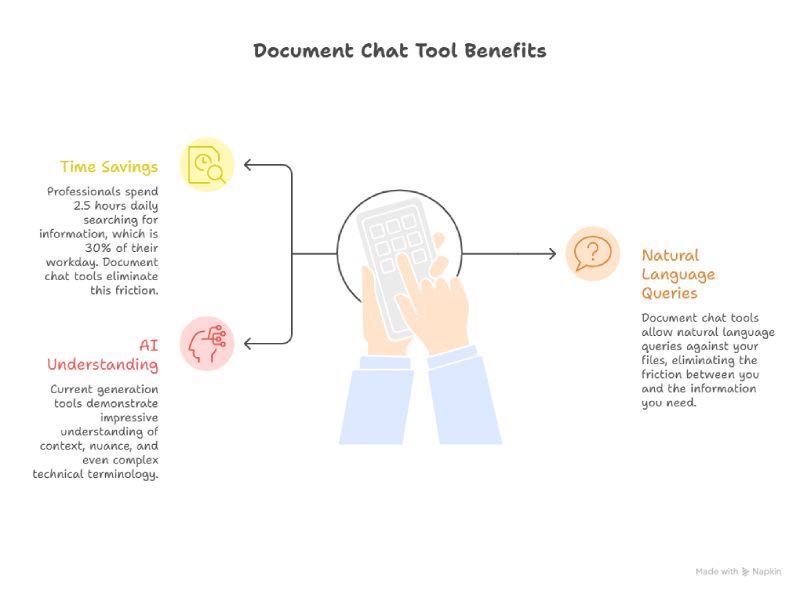
Consider the numbers: professionals spend an average of 2.5 hours daily searching for information. That’s roughly 30% of a standard workday lost to hunting through files and databases.
Document chat tools address this problem elegantly. By allowing natural language queries against your files, they eliminate the friction between you and the information you need.
You ask a question in plain language. The AI retrieves the relevant answer along with citations showing exactly where that information appears. Simple as that.
The technology has matured remarkably quickly. Current generation tools demonstrate impressive understanding of context, nuance, and even complex technical terminology.
Top Tools for Chatting With PDFs and Documents
Denser Studio
Denser Studio has emerged as a standout option for professionals who need reliable, accurate document interaction. The platform prioritizes precision over flashy features that don’t deliver real value.
What makes Denser Studio particularly impressive is its ability to handle complex documents without losing context. Many tools struggle with technical papers or files containing tables and figures. Denser Studio manages these challenges gracefully.
The system understands document structure. It can differentiate between main text, footnotes, headers, and supplementary materials with ease.
If you’re researching the best ai pdf reader options available today, Denser Studio deserves serious consideration. The platform offers both document chat capabilities and broader knowledge base features.
The interface is clean and intuitive. You can upload documents, ask questions immediately, and receive responses with clear citations pointing to specific sections.
This citation feature is crucial for anyone who needs to verify information or reference sources in their own work. Pricing remains competitive, especially considering the accuracy and feature depth offered.
ChatPDF
ChatPDF gained early traction by offering a straightforward, no frills approach to PDF interaction. You upload a PDF, and you can start chatting with it immediately.
The simplicity is both a strength and a limitation. For users who need quick answers from individual documents without complex setup, ChatPDF delivers efficiently.
The interface couldn’t be more straightforward. Even those who consider themselves technology averse can get started within minutes.

Performance on standard documents is solid. However, the tool can struggle with highly technical content or unusual formatting.
The free tier allows reasonable usage for casual needs. Paid plans unlock additional features like higher upload limits and faster processing. For students with occasional document queries, ChatPDF provides a functional starting point.
Adobe Acrobat AI Assistant
Adobe’s entry into the document chat space leverages their decades of PDF expertise. The AI Assistant integrates directly into Acrobat, meaning users familiar with Adobe’s ecosystem can access AI features without switching applications.
The integration advantage is significant. You can work on a document, ask questions, receive answers, and continue editing all within the same application.
Adobe’s AI demonstrates strong comprehension of document formatting and structure. Tables, forms, and complex layouts are handled competently.
However, Adobe’s pricing model requires consideration. The AI features are bundled into broader Acrobat subscriptions. For users already paying for Acrobat, the AI additions feel like welcome bonuses. For others, dedicated document chat tools might offer better value.
Humata
Humata positions itself as a research accelerator. The platform delivers features specifically designed for academic and professional research workflows.
The ability to upload multiple documents and query across them simultaneously sets Humata apart. This cross document querying proves invaluable for literature reviews and competitive analysis.
Rather than chatting with files individually and manually combining insights, Humata handles the synthesis automatically. It’s a genuine time saver.
The platform includes collaboration features for team based research projects. Multiple users can access shared document collections and build upon each other’s queries.

Unriddle
Unriddle takes an interesting approach by combining document chat with note taking and knowledge management. The platform aims to become your research companion throughout entire projects.
When you chat with documents in Unriddle, the system helps you build connections between concepts. It identifies related information across your document library and develops structured notes based on your findings.
The AI demonstrates particular strength in understanding academic and scientific content. Technical terminology and nuanced claims are handled with sophistication that simpler tools can’t match.
The learning curve is steeper than bare bones alternatives. But the investment pays dividends for heavy users processing large volumes of documents regularly.
Notion AI
For teams already using Notion as their knowledge hub, the platform’s AI features provide native document interaction. You can chat with pages, databases, and uploaded documents directly within your existing workspace.
Everything happens within a familiar environment. Your document chats connect naturally to your notes, projects, and team knowledge bases.
Notion’s AI performs well on standard documents. It may not match dedicated document AI tools when handling highly specialized technical content, but the convenience factor is hard to beat.
Pricing bundles AI features with Notion subscriptions. This creates value for existing users while potentially complicating things for those evaluating Notion specifically for document AI.
How to Choose the Right Tool
Selecting the optimal solution depends on several factors worth considering carefully.
Start by assessing your document types. Straightforward text documents work fine with simpler tools. Complex technical papers or legal documents require more sophisticated options.
Consider your workflow integration needs. Standalone tools offer focused functionality. Integrated solutions reduce context switching. The right choice depends on your existing technology stack.
Evaluate collaboration requirements honestly. Individual users have different needs than teams sharing document libraries. Features you’ll never use just add unnecessary complexity.
Finally, test before committing. Most platforms offer free trials or limited free tiers. Upload your real documents, ask your actual questions, and judge results based on genuine work scenarios.
Getting Maximum Value From Document Chat Tools
Whatever platform you choose, certain practices maximize your results.
Ask specific questions. Broad queries like “summarize this document” often produce generic responses. Focused questions yield precise, actionable answers.
Verify important information. AI tools are remarkably accurate but not infallible. For critical decisions, confirm key facts against the source material directly.
Organize your document libraries thoughtfully. Most platforms perform better when documents are logically grouped and clearly named. A few minutes spent on organization saves hours later.
Provide feedback when responses miss the mark. Many platforms use feedback to improve their models. Your input helps future users encountering similar documents.
Looking Forward
Document chat technology continues advancing rapidly. Features that seemed futuristic months ago are becoming standard.
For professionals drowning in documents, these tools offer genuine relief. Hours previously spent hunting through pages can be redirected toward analysis and decision making.
The key is starting somewhere. Pick a tool that matches your needs, commit to learning its capabilities, and integrate it into your workflow.
Your documents contain valuable information. Modern tools finally make accessing that information as simple as asking a question. That’s a transformation worth embracing.
Also Read: AI-Driven Business Intelligence for Smarter SME Decisions